
生活照最大的问题不是“不好看”,而是“不够正式”。
求职简历、LinkedIn 个人主页、企业官网简介、会议嘉宾介绍,这些场景里的头像有一套默认审美:背景干净、脸部清晰、服装正式、表情自然,整体看起来可信、专业、不抢戏。普通生活照往往会有杂乱背景、休闲服装、角度随意、光线不稳定等问题,直接使用会削弱职业感。
Nano Banana 这类 AI(人工智能)图像编辑工具,适合处理这种“保留原本人脸,但重做照片风格”的任务。关键不在于简单写一句“把它变成简历照”,而是要把头像照片的几个关键变量讲清楚:人物身份、画面构图、服装、背景、光线、表情,以及不允许出现的干扰元素。
一个合格的商务头像提示词,目标不是把人修成另一个人,而是把照片改造成更适合正式场合的版本。
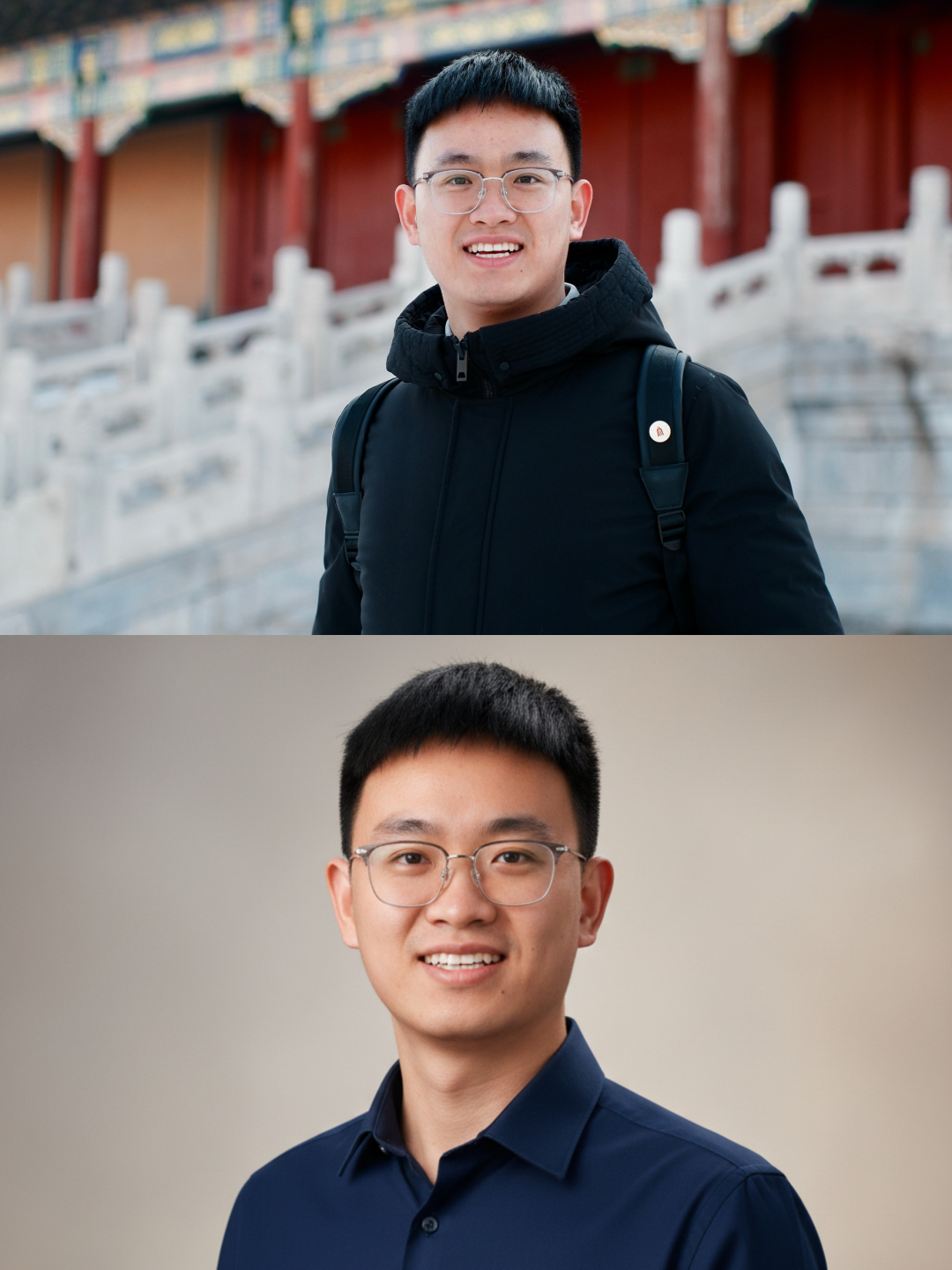
这类效果的核心是“身份不变,场景升级”:人脸特征要尽量保持一致,画面则从生活照环境切换到摄影棚风格。判断生成结果是否可用,不能只看是否变好看,还要看它是否仍然像本人、是否适合放进简历或职业主页。
提示词的核心结构
生成专业简历头像时,可以把提示词拆成 6 个模块。
flowchart TD
    A[上传生活照] --> B[保持身份一致]
    B --> C[控制头像构图]
    C --> D[替换正式服装]
    D --> E[重建干净背景]
    E --> F[设置棚拍光线]
    F --> G[限制干扰元素]
    G --> H[输出商务简历头像]
每个模块负责约束一个容易失控的地方:
| 模块 | 解决的问题 | 应该写清楚的内容 |
|---|---|---|
| 身份一致 | 避免生成结果不像本人 | 保留原始面部特征、年龄感、五官比例 |
| 构图 | 避免角度随意或裁切奇怪 | 头肩半身照、正面或轻微侧身、1:1 比例 |
| 服装 | 避免生活化穿搭 | 纯色有领衬衣、商务风、无图案和 Logo |
| 背景 | 避免生活照背景杂乱 | 摄影棚背景、浅灰或米色、柔和渐变 |
| 光线 | 避免脸部暗沉或过度美颜 | 柔和棚拍光、肤色真实、清晰自然 |
| 负面限制 | 避免出现水印、文字、滤镜感 | no text、no logo、no watermark、no clutter |
这些约束越具体,模型越容易朝“职业头像”方向生成,而不是随意改成艺术照、证件照或广告大片。
英文提示词版本
很多图像生成和图像编辑模型对英文指令的理解更稳定,尤其是涉及摄影、构图、光线、背景材质这类描述时,英文提示词通常更容易得到一致结果。
可以直接使用下面这个版本:
Transform the uploaded casual photo into a high-end professional business portrait for a resume.

Keep the original face, identity, age impression, and facial features fully consistent.

Use a formal head-and-shoulders composition with a 1:1 aspect ratio. The framing should be clean, balanced, and suitable for a resume or LinkedIn profile photo.

The man should wear a premium solid-colored dress shirt, such as navy blue, charcoal gray, or light blue. The shirt must have a visible collar and should look neat, elegant, and professional, with no logos, patterns, or distracting details.

Replace the original background with a subtle gradient or lightly textured studio background in warm neutral tones, such as light gray or soft beige. Keep the background softly blurred to create depth while keeping attention on the face.

Apply soft studio lighting that naturally highlights the facial features. Keep realistic skin tones, high clarity, and a natural texture. Avoid heavy retouching or an artificial beauty filter look.

The expression should be confident, approachable, modern, relaxed, and professional.

The final image should look like a refined corporate headshot suitable for resumes, LinkedIn, company websites, and professional profiles.

--no text, logos, clutter, watermarks, artistic effects, exaggerated retouching, distorted face, changed identity, extra accessories, or distracting elements
这个提示词不是只描述“好看”,而是把商务头像拆成了可执行的图像编辑要求。模型收到的是一组明确约束:脸不能变,构图要正式,衣服要商务,背景要干净,光线要像摄影棚,最终用途是简历和职业主页。
中文提示词版本
如果更习惯中文,也可以使用中文版本。中文提示词最好写得完整,不要只写关键词。
将上传的生活照片转换为一张高端、自然、正式的男士商务简历头像。

保持人物的原始面部特征、身份一致性、年龄感和五官比例,不要改变成另一个人。

构图采用正式的头肩半身照,画面比例为 1:1,人物居中,裁切干净,比例均衡,适合用于简历、LinkedIn 个人主页或企业官网头像。

人物穿着高质感的纯色有领衬衣,颜色可以是海军蓝、深灰或浅蓝。衣服需要整洁、简约、商务化,不要出现图案、品牌标志或夸张装饰。

将原本杂乱的生活背景替换为柔和的摄影棚背景,背景可以使用浅灰色或米色的中性色调,带有轻微渐变或细腻纹理,并适度虚化,突出人物面部。

使用柔和自然的棚拍光线,让面部特征清晰、肤色真实、细节自然。不要过度磨皮,不要产生明显美颜滤镜感。

人物表情应当自信、亲和、放松、现代,并保持专业感。

最终效果应当像一张精致的企业商务头像,适合放在简历、LinkedIn、个人官网、会议介绍或职业档案中。

--不要文字、Logo、水印、杂乱背景、夸张艺术滤镜、过度修图、五官变形、身份改变、多余配饰或干扰元素
如果使用的工具不支持 --no 这种负面提示词写法,可以把最后一行改成普通句子:
画面中不要出现文字、Logo、水印、杂乱背景、夸张艺术滤镜、过度修图、五官变形、身份改变、多余配饰或干扰元素。
为什么这个提示词有效
专业头像看起来“正式”,并不是因为模型加了某个神秘滤镜,而是几个视觉要素同时被控制住了。
1. 先锁定身份一致性
人像编辑最容易出现的问题是“变好看了,但不像本人了”。简历头像尤其不能这样,因为头像的作用是让招聘方或合作方识别真实的人,而不是生成一个虚构形象。
提示词里需要明确写:
Keep the original face, identity, age impression, and facial features fully consistent.
中文可以写:
保持人物的原始面部特征、身份一致性、年龄感和五官比例,不要改变成另一个人。
这里有几个关键词很重要:
| 关键词 | 作用 |
|---|---|
| original face | 保留原脸 |
| identity | 保持身份一致 |
| age impression | 不要明显变年轻或变老 |
| facial features | 不要重塑五官 |
| fully consistent | 强化一致性约束 |
如果只写“保持原脸”,模型有时仍会调整脸型、鼻梁、眼睛大小或皮肤质感。把身份、年龄感、五官比例一起写进去,结果会更稳定。
2. 用头肩半身照建立正式感
简历头像通常不需要全身照,也不适合太近的大头照。更稳妥的构图是头肩半身照,也就是从头部到肩膀或上胸区域。
Use a formal head-and-shoulders composition with a 1:1 aspect ratio.
这种构图有三个好处:
| 构图要求 | 效果 |
|---|---|
| head-and-shoulders | 保留面部和肩部,让人物更自然 |
| formal composition | 避免生活照角度过于随意 |
| 1:1 aspect ratio | 适合头像上传框、LinkedIn 和多数职业平台 |
1:1 比例很实用,因为大多数平台头像都会裁成方形或圆形。如果生成时不指定比例,后期上传时可能被裁掉头顶、肩膀或衣领。
3. 服装要具体到颜色和款式
“穿得正式一点”对模型来说太模糊。它可能生成西装、领带、礼服,也可能把衣服处理成夸张的时尚大片风格。
更好的写法是直接指定:
The man should wear a premium solid-colored dress shirt, such as navy blue, charcoal gray, or light blue.
这里选择纯色有领衬衣,是因为它比 T 恤更正式,又比西装领带更自然,适合大多数简历和职业主页场景。
| 服装元素 | 推荐写法 | 不建议写法 |
|---|---|---|
| 款式 | 有领衬衣 | 随便正式一点 |
| 颜色 | 海军蓝、深灰、浅蓝 | 鲜艳颜色、复杂花纹 |
| 质感 | 干净、挺括、商务 | 夸张、高定、舞台感 |
| 标识 | 无 Logo、无图案 | 品牌标志明显 |
如果希望头像更像企业高管照,可以把“dress shirt”改成“business suit with a plain shirt”,但要注意西装更容易让画面显得过度正式,不一定适合所有岗位。
4. 背景要弱化,而不是抢镜
生活照的背景通常包含街景、餐厅、室内杂物、其他人或强烈色块,这些元素都会分散注意力。职业头像的背景应该服务于人物,而不是成为画面主角。
提示词可以这样写:
Replace the original background with a subtle gradient or lightly textured studio background in warm neutral tones, such as light gray or soft beige.
这里的重点是:
| 背景要求 | 原因 |
|---|---|
| studio background | 建立摄影棚质感 |
| light gray / soft beige | 中性色更适合正式场合 |
| subtle gradient | 避免背景死板 |
| softly blurred | 增加景深,让人物更突出 |
| no clutter | 清除杂乱物体 |
浅灰和米色是比较稳的选择。它们不会像纯白背景那样接近证件照,也不会像深色背景那样显得压抑。
5. 光线要自然,不能像重度美颜
很多 AI 人像图最大的问题是“过度精修”:皮肤像塑料,五官太锋利,眼神不自然,整体看起来不像真实摄影。
所以光线部分不能只写“高清”“好看”,而要强调真实肤色和自然质感:
Apply soft studio lighting that naturally highlights the facial features. Keep realistic skin tones, high clarity, and a natural texture.
这句话控制的是三个层面:
| 光线要求 | 控制效果 |
|---|---|
| soft studio lighting | 避免强烈阴影 |
| naturally highlights | 让脸部清楚但不过分锐化 |
| realistic skin tones | 保持肤色真实 |
| natural texture | 避免塑料感和过度磨皮 |
简历头像追求的是可信和清爽,不是网红写真效果。提示词里加入“avoid heavy retouching”很有必要。
6. 表情要专业,但不能僵硬
职业头像不等于严肃板脸。过于严肃会有距离感,笑得太夸张又不够正式。比较稳妥的表达是:
The expression should be confident, approachable, modern, relaxed, and professional.
这几个词分别控制不同方向:
| 表情词 | 作用 |
|---|---|
| confident | 看起来有精神 |
| approachable | 不显得冷漠 |
| relaxed | 避免僵硬 |
| professional | 控制正式程度 |
| modern | 避免老式证件照风格 |
如果原始生活照的表情太夸张,模型不一定能完全修正。最好选择一张面部清晰、表情自然、没有大幅遮挡的原图。
使用步骤
操作流程可以简化成 4 步。
sequenceDiagram
    participant U as 用户
    participant N as Nano Banana
    participant I as 上传照片
    participant P as 提示词
    participant R as 生成结果

    U->>I: 选择一张清晰生活照
    U->>P: 粘贴商务头像提示词
    I->>N: 提供原始人像
    P->>N: 约束身份、构图、服装、背景和光线
    N-->>R: 输出专业简历头像
    U->>R: 检查相似度、自然度和可用性
实际使用时,可以按这个顺序来:
-
选择一张面部清晰的生活照
最好是正脸或轻微侧脸,脸部无遮挡,分辨率不要太低。 -
上传到 Nano Banana
使用图像编辑模式,而不是纯文本生成模式。 -
粘贴英文或中文提示词
如果工具对英文更稳定,优先用英文版本。 -
检查生成结果
重点看是否像本人、脸有没有变形、衣领是否自然、背景有没有多余文字或水印。 -
不满意就局部调整提示词
不要一次改太多,只改一个变量,例如只调整背景颜色,或只要求减少磨皮。
可复用的提示词模板
如果想以后快速套用,可以使用这个模板,把括号里的内容换成自己的需求。
Transform the uploaded casual photo into a professional business headshot for [resume / LinkedIn / company profile].

Keep the original face, identity, age impression, and facial features fully consistent.

Use a [head-and-shoulders / upper-body] composition with a [1:1 / 4:5] aspect ratio. The framing should be clean, balanced, and professional.

The person should wear [a solid-colored dress shirt / a business suit / a blazer and shirt] in [navy blue / charcoal gray / light blue / black / white]. The clothing should be neat, elegant, and free of logos, patterns, or distracting details.

Replace the background with [a light gray studio background / a soft beige gradient background / a neutral blurred office background]. Keep it clean, subtle, and softly blurred.

Use soft studio lighting with realistic skin tones, clear facial details, and natural texture. Avoid heavy retouching or artificial beauty filters.

The expression should be [confident / approachable / relaxed / professional].

The final image should be suitable for [resumes / LinkedIn / company websites / professional profiles].

--no text, logos, watermarks, clutter, distorted face, changed identity, exaggerated retouching, artistic effects, or distracting elements
常见替换方式:
| 目标场景 | 推荐关键词 |
|---|---|
| 求职简历 | resume, professional, clean framing |
| LinkedIn profile photo, approachable, modern | |
| 企业官网 | corporate headshot, refined, studio lighting |
| 会议嘉宾头像 | speaker profile, professional portrait, confident |
| 创业者主页 | modern founder portrait, clean background, approachable |
参数和描述怎么取舍
提示词不是越长越好,而是要把关键约束写完整。可以把优先级分成三层。
| 优先级 | 必须写 | 可选写 |
|---|---|---|
| 高 | 保持身份一致、头肩照、正式服装、干净背景 | 无 |
| 中 | 1:1 比例、柔和棚拍光、真实肤色 | 背景轻微纹理 |
| 低 | 高管风、现代感、亲和力 | 具体色号、材质细节 |
如果生成结果总是不像本人,把提示词里关于服装、背景的描述稍微缩短,强化身份一致性:
The most important requirement is to preserve the original identity and facial features. Do not change the person's face, age impression, facial proportions, or recognizable characteristics.
如果生成结果太像证件照,可以增加摄影棚肖像感:
The image should look like a refined corporate studio portrait, not an ID photo or passport photo.
如果生成结果太像艺术写真,可以加强简历用途:
The style should be realistic, professional, and suitable for resumes and LinkedIn, not artistic, cinematic, or fashion editorial.
常见问题和修改方式
生成结果不像本人
身份一致性没有压住,或者原图质量太差。
可以补充:
Preserve the person's original identity as the highest priority. Keep the same face shape, eyes, nose, mouth, skin tone, age impression, and overall recognizable appearance.
同时尽量换一张更清晰的原图,避免墨镜、口罩、强阴影、侧脸过大等情况。
衣服变得太夸张
模型可能把“高端”理解成奢华礼服或时尚大片。
把描述改得更朴素:
Use a simple, realistic, solid-colored business shirt. Avoid luxury fashion styling, shiny fabric, dramatic suits, or overly formal outfits.
背景像证件照
如果背景太白、太平,可以强调渐变和轻微景深:
Use a subtle warm gray or beige gradient studio background with slight depth, not a plain white ID photo background.
皮肤过度磨皮
增加真实质感约束:
Keep natural skin texture and realistic facial details. Avoid plastic skin, excessive smoothing, or beauty filter effects.
画面出现文字或水印
负面提示词要写得更明确:
No text, no captions, no logo, no watermark, no signature, no decorative typography.
头像裁切不适合平台上传
强化比例和构图:
Use a centered 1:1 square composition with enough space around the head and shoulders, suitable for circular profile photo cropping.
原图选择也会影响结果
提示词只能解决一部分问题,原始照片质量会直接影响生成结果。用于简历头像的输入图,最好满足这些条件:
| 原图条件 | 推荐 | 避免 |
|---|---|---|
| 脸部 | 清晰、无遮挡、正脸或轻微侧脸 | 墨镜、口罩、强遮挡 |
| 光线 | 面部亮度均匀 | 逆光、强阴影、夜景噪点 |
| 表情 | 自然微笑或放松表情 | 夸张表情、闭眼、低头 |
| 分辨率 | 中高分辨率 | 模糊截图、压缩严重 |
| 背景 | 不重要,但人物边缘清楚 | 人物和背景颜色混在一起 |
如果只有一张很模糊的照片,再好的提示词也很难生成可信的职业头像。更稳妥的做法是先选一张脸部清晰的照片,再交给 Nano Banana 处理服装、背景和光线。
一份更稳的最终版提示词
日常使用时,可以直接复制这个精简但完整的版本:
Transform the uploaded casual photo into a realistic professional business headshot suitable for a resume and LinkedIn.

Preserve the person's original identity, face shape, facial features, skin tone, age impression, and recognizable appearance. Do not change the person into someone else.

Use a clean 1:1 head-and-shoulders composition with balanced framing and enough space around the head and shoulders for profile photo cropping.

Dress the person in a neat solid-colored business shirt with a visible collar, such as navy blue, charcoal gray, or light blue. The clothing should be simple, elegant, and free of logos or patterns.

Replace the background with a soft neutral studio background in light gray or beige, with a subtle gradient and slight blur for depth.

Use soft studio lighting, realistic skin tones, clear facial details, and natural skin texture. The expression should look confident, approachable, relaxed, and professional.

The final image should look like a refined corporate portrait, not an ID photo, fashion editorial, or heavily retouched beauty photo.

--no text, logos, watermarks, clutter, distorted face, changed identity, exaggerated retouching, plastic skin, artistic filters, distracting accessories, or messy background
这套写法的重点是把“生活照变简历照”变成一个可控的图像编辑任务:保留人脸身份,统一构图和比例,换成商务服装,清理背景,使用自然棚拍光,再用负面提示词排除文字、水印、过度修图和五官变形。只要原图足够清晰,生成结果通常会比普通美颜修图更适合正式职业场合。